



For photographers, having a reliable platform for managing galleries, websites, client communication and photo delivery can make running a creative business much easier. Pixieset is designed specifically for photographers, bringing several important business and photography tools together in one platform. Whether you use Pixieset to deliver galleries, manage your website, sell prints or organise client projects, the first step is knowing how to access your account through the Pixieset login page.
Pixieset provides an official login page where users can enter their email address and password or use supported social sign-in options. (Pixieset) This guide explains how Pixieset login works, what to do if you forget your password, how login verification protects your account and how to resolve some common access problems.
What Is Pixieset?
Pixieset is an all-in-one platform created for photographers. It provides tools for delivering photographs through online galleries, building photography websites, selling prints and digital downloads, managing bookings and payments, and handling other aspects of a photography business. Pixieset says its platform is used by more than one million photographers worldwide. (Pixieset)
Instead of relying on separate services for every part of a photography workflow, photographers can use Pixieset to connect several activities within one account. This makes the login process particularly important because access to one account can provide entry to multiple Pixieset products and services.https://nybusines.com
How to Access the Pixieset Login Page
To log in, visit the official Pixieset account login page. The page provides options to continue with Google or Apple, as well as the traditional email-and-password method. (Pixieset)
If you use email and password, enter the email address associated with your Pixieset account and then enter your password. After submitting the information, Pixieset may ask for additional verification if the login attempt comes from a device or location that it does not recognise.
For security reasons, it is always best to access Pixieset through the official website rather than entering your credentials on unfamiliar third-party pages.
Logging In With Google
Pixieset supports Google sign-in for eligible accounts. According to Pixieset’s support documentation, if your Google account uses the same email address connected to your Pixieset account, you can use the Continue with Google option to access the account. (Pixieset Help Center)
This can make logging in more convenient because you do not necessarily need to enter a separate Pixieset password each time. However, it is important to use the correct Google account. If you have multiple Google accounts, selecting the wrong account may lead to confusion about which Pixieset account you are accessing.
Logging In With Apple
Pixieset also offers Sign in with Apple. Existing Pixieset users can connect an Apple Account when the email addresses match. Pixieset explains that users connecting an existing account should choose Share My Email rather than Apple’s Hide My Email option, because using a different or randomised email address can result in a separate Pixieset account being created. (Pixieset Help Center)
This is particularly important if your account appears empty after using Apple sign-in. In such circumstances, the wrong email connection may have created or opened a different account.
What to Do If You Forget Your Pixieset Password
Forgetting a password does not necessarily mean you have lost access to your Pixieset account. On the login screen, select Lost Password? to begin the password recovery process. Pixieset will send a password-reset email to the address associated with your account. (Pixieset Help Center)
If you do not immediately see the message, check your spam or junk folder. It can also help to search your inbox for Pixieset-related messages. Pixieset recommends ensuring that messages from its relevant email addresses are allowed by your email provider. (Pixieset Help Center)
When resetting your password, choose a strong and unique password rather than reusing a password from another service. A unique password can reduce the potential impact if credentials used elsewhere are compromised.
Forgotten Pixieset Account Emailhttps://nybusines.com
Another common problem is forgetting which email address was used to create a Pixieset account. If this happens, search your email accounts for previous messages from Pixieset. The company recommends looking for messages such as the original Welcome to Pixieset email, which can help identify the account email. (Pixieset Help Center)
If you have multiple email addresses, checking each inbox can help determine which one is connected to the account. If you cannot access the original email address or continue experiencing problems, Pixieset recommends contacting its support team.
Understanding Pixieset Login Verification
Pixieset uses login verification as an additional security measure. When a login comes from an unrecognised device or location, the system may send a verification email containing a unique code. The code may be required before access to the dashboard is granted. (Pixieset Help Center)
If you are expecting a verification message, check the inbox associated with your Pixieset account. You should also check your spam or junk folder. Searching for the subject New login attempt to Pixieset can make the message easier to find. (Pixieset Help Center)
If you receive an unexpected login notification that you do not recognise, treat it seriously. Changing your password and reviewing your account security settings can help protect the account.
Two-Factor Authentication
Pixieset also supports optional two-factor authentication, commonly called 2FA. This provides another layer of protection beyond the standard username and password combination. When 2FA is enabled, a code generated through an authentication app may be required during login. (Pixieset Help Center)
Pixieset explains that 2FA codes are generated through an authenticator app rather than being delivered through ordinary text messages or email. Users who lose access to their authentication app may be able to use emergency backup codes created during the original setup. (Pixieset Help Center)
For photographers whose Pixieset account contains valuable client photographs or business information, enabling additional account security can be a sensible precaution.
Managing Your Pixieset Login Details
After signing in, Pixieset allows users to manage important account information from the Account section. This includes the account email address, password and security settings. Users can also review active devices and browsers associated with their account. (Pixieset Help Center)
If you notice a device or browser session that you do not recognise, Pixieset provides an option to end that session. The company also recommends changing your password after removing an unfamiliar session. (Pixieset Help Center)
Regularly reviewing account security is especially useful if you work from several computers, travel frequently or share devices with other people.https://nybusines.com
Why Pixieset Login Matters to Photographers
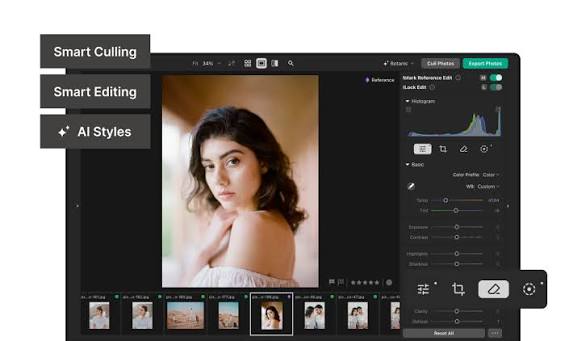
Logging into Pixieset is more than simply accessing an online photo gallery. The platform connects photographers with several tools designed to support their businesses. Pixieset currently offers Client Gallery, Website, Studio Manager, Store and Photo Editor products, among others. (Pixieset)
The Client Gallery allows photographers to deliver and share photographs with clients, while the website tools help photographers create an online presence. Other features can support bookings, payments, selling products and editing workflows.
Because so many business activities can be connected to one account, maintaining secure login credentials is important.https://nybusines.com
Final Thoughts
The Pixieset login process is straightforward, with options for email and password as well as supported Google and Apple sign-in methods. If you forget your password, Pixieset provides a password recovery process, while login verification and optional two-factor authentication provide additional security.
For the safest experience, use the official Pixieset login page and keep your account email, password and authentication methods up to date. If you encounter an unfamiliar login notification, an empty account after social sign-in or another persistent access problem, Pixieset’s official support resources provide guidance for recovering and securing your account. (Pixieset Help Center)
With secure access in place, photographers can take full advantage of Pixieset’s connected tools for delivering images, managing clients, presenting their work online and growing their photography businesses.