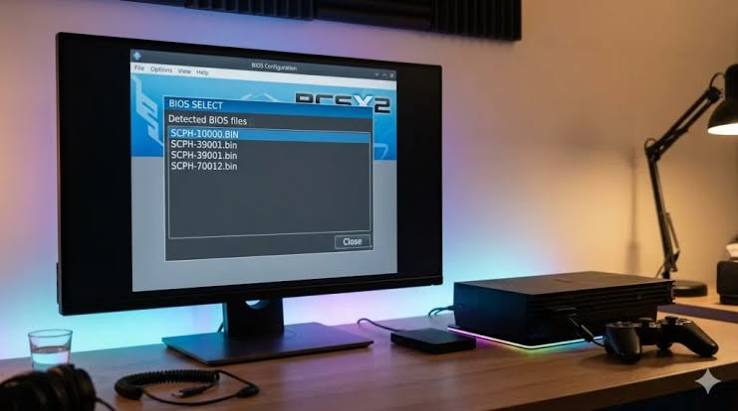
For many gamers, the PlayStation 2 remains one of the most memorable consoles ever released. With an enormous library of games spanning action, racing, role-playing, sports and adventure genres, the PS2 continues to attract players years after the console’s original launch. One of the most popular ways to revisit these games on a modern computer is through PCSX2, an open-source PlayStation 2 emulator.
A PCSX2 download can provide access to a powerful tool for running compatible PlayStation 2 games on Windows, Linux and other supported platforms. However, downloading and setting up an emulator involves more than simply installing a programme. Users also need to understand system requirements, BIOS requirements, game compatibility and the legal considerations surrounding PlayStation 2 software.nybusines.com
What Is PCSX2?
PCSX2 is an open-source emulator designed to reproduce the functionality of the PlayStation 2 on modern computers. The project has been developed over many years and has become one of the best-known PS2 emulation solutions available.
An emulator essentially recreates the behaviour of a console through software. Instead of requiring the original PlayStation 2 hardware, PCSX2 allows compatible games to run through a computer. Depending on the computer’s hardware and the particular game, users can potentially play at resolutions and frame rates beyond the capabilities of the original console.
PCSX2 also includes features designed specifically for modern gaming systems. These can include graphical enhancements, controller configuration, save states, widescreen options and various performance settings.
Where Should You Download PCSX2?
The safest approach is to obtain PCSX2 from its official project website or its official distribution channels. Avoid unfamiliar websites offering modified installers, “pre-configured” packages or downloads bundled with unknown software.
Unofficial emulator downloads can potentially contain malware, unwanted applications or altered versions of the original programme. A genuine PCSX2 installation should come from a trustworthy source and should not require suspicious third-party installers.
Before downloading, check that you are selecting the version appropriate for your operating system. PCSX2 releases may change over time, so using the current official release generally provides access to the latest improvements, bug fixes and compatibility updates.nybusines.com
PCSX2 System Requirements
The hardware required to run PCSX2 depends considerably on the games you want to play and the graphical settings you intend to use.
A modern multi-core processor is important because emulation can be demanding. A reasonably capable graphics processor is also useful, particularly when increasing internal resolution or enabling graphical enhancements.
Memory requirements are usually less demanding than CPU and GPU requirements, although having sufficient RAM helps the overall operating system and emulator run smoothly.
For the best experience, users should compare their computer’s specifications with the current requirements published by the PCSX2 project. Older or low-powered computers may be able to run some games but struggle with more demanding titles.nybusines.com
Understanding the PS2 BIOS Requirement
One of the most important parts of PCSX2 configuration is the PlayStation 2 BIOS. The BIOS is firmware used by the original console and is required for accurate emulation.
PCSX2 does not simply provide a downloadable PlayStation 2 BIOS for users. Instead, users should obtain the BIOS from a PlayStation 2 console they legally own, following the appropriate instructions and laws applicable to their location.nybusines.com
This distinction is important because websites offering PS2 BIOS files for direct download may not have the legal rights to distribute them. Downloading copyrighted firmware from an unauthorised source can create legal and security concerns.
Once legally obtained, the BIOS can be configured within PCSX2 during the emulator’s setup process.
Installing PCSX2
After downloading the legitimate PCSX2 installer, installation is generally straightforward. Users normally select their operating system version, run the installer and follow the instructions provided on screen.nybusines.com
During the first configuration process, PCSX2 may ask users to select important settings such as language, graphics configuration, controller preferences and BIOS location.
Modern versions of PCSX2 are designed to make initial configuration easier than older releases. Nevertheless, users may need to adjust settings depending on their computer and the particular game they want to run.
It is usually best to begin with default settings. If a game works correctly, there is little reason to change numerous options immediately.
Adding Games to PCSX2
PCSX2 does not automatically provide commercial PlayStation 2 games. Users need their own legally obtained game discs or backups that they are permitted to use.
Depending on the setup, games can be loaded from compatible disc media or from properly created game images. The exact process can vary according to the PCSX2 version and operating system.
Users should avoid websites distributing unauthorised copies of commercial PS2 games. Apart from the copyright concerns, such downloads can expose computers to malicious files.nybusines.com
The safest approach is to use games that you own and create or use backups in accordance with applicable laws.
Improving Graphics
One of the major attractions of PCSX2 is its ability to improve the visual presentation of PlayStation 2 games.
The original PS2 was designed for televisions and hardware from the early 2000s. A modern computer can potentially render games at much higher internal resolutions. This can make character models, environments and menus appear significantly sharper.
PCSX2 may also provide options for widescreen presentation, texture filtering and other graphical improvements. However, increasing graphical settings can place additional demands on your computer.
If you experience slowdowns, graphical glitches or unstable performance, reducing the internal resolution or disabling certain enhancements can often help.
Controller Support
Playing PS2 games with a keyboard is possible, but many users prefer a game controller because it provides an experience closer to the original console.
PCSX2 supports configurable controllers, allowing users to map buttons and analogue controls according to their preferences. Modern USB and wireless controllers can often be configured for use with the emulator.
Taking a few minutes to configure the controller properly can make a significant difference, especially in racing, fighting and action games where analogue controls are important.nybusines.com
Game Compatibility
Not every PlayStation 2 game behaves exactly the same way in an emulator. PCSX2 has developed extensive compatibility across the PS2 library, but individual games can still experience graphical glitches, performance problems or other issues.
Compatibility can also vary depending on the PCSX2 version, computer hardware and emulator configuration.
If a particular game does not work correctly, users can consult the PCSX2 project’s compatibility information and community documentation. Updating to a newer version can also resolve problems that existed in earlier releases.
Is PCSX2 Free?
Yes. PCSX2 is an open-source project and the emulator itself is available without the need to purchase a commercial licence.
However, “free emulator” does not mean that all associated software is free to download. PlayStation 2 BIOS files and commercial games are separate matters and may be protected by copyright.nybusines.com
Users should therefore distinguish between obtaining the PCSX2 emulator and obtaining copyrighted PlayStation 2 software.
Final Thoughts
A PCSX2 download is an excellent option for players who want to experience PlayStation 2 games on modern computers. The emulator combines compatibility with useful features such as higher-resolution rendering, controller support, save functionality and graphical enhancements.nybusines.com
For the safest experience, download PCSX2 from its official source, use a legally obtained BIOS and play games you are legally entitled to use. Starting with the default configuration is generally the easiest approach, after which graphical and performance settings can be adjusted gradually.nybusines.com
With suitable hardware and a properly configured installation, PCSX2 can provide a convenient way to revisit the extensive PlayStation 2 library while taking advantage of the capabilities of today’s computers.nybusines.com